Available to buy here:
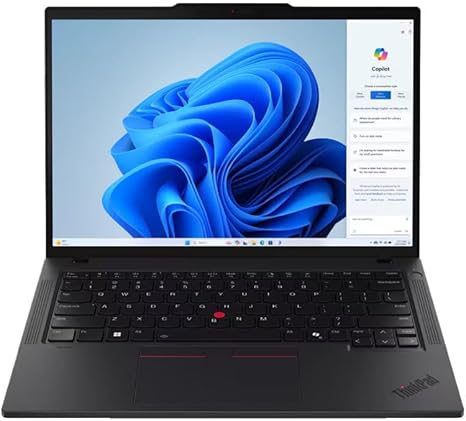
Welcome to “Reviews inside tv”! Today, we’re taking a close look at the Lenovo ThinkPad P14s Gen 5, a 14-inch mobile workstation designed for professionals who need power, reliability, and performance on the go. Whether you’re an engineer, developer, or someone who demands a powerful laptop for work-related tasks, the ThinkPad P14s promises to deliver. But does it live up to the expectations? Let’s dive into the specs and real-world performance to see if it’s the right choice for you.
At the heart of this mobile workstation, you’ll find the AMD Ryzen 7 PRO 8840HS processor. With 8 cores and 16 threads, this CPU is built to handle multitasking and demanding applications with ease. Whether you’re working with spreadsheets, running virtual machines, or performing complex data analyses, the Ryzen 7 PRO delivers impressive raw power. It’s a clear step up from entry-level processors, offering both performance and efficiency for professional workloads.
When paired with the integrated AMD Radeon graphics, the ThinkPad P14s provides decent performance for most non-gaming tasks, like media consumption, video editing, and light graphic work. However, it’s not a gaming laptop, so if you’re looking for a powerhouse for AAA games, this isn’t the one for you. But, for business applications, the graphics are more than capable of handling tasks like 2D CAD work, video conferencing, and content creation without breaking a sweat.
This model comes equipped with 16 GB of RAM, a solid amount for handling multitasking without major slowdowns. If you’re running numerous applications at once, you’ll appreciate the smooth experience here. 16 GB will easily handle multiple browser tabs, office applications, and even some heavier workloads. As for storage, the 512 GB SSD provides quick boot times and fast file transfers. It’s more than enough for storing documents, photos, and a decent-sized media library. Plus, with an NVMe drive, you get faster read and write speeds compared to SATA-based SSDs, which means less waiting around for files to open or save.
On the display front, the Lenovo ThinkPad P14s comes with a 14-inch WUXGA panel with a resolution of 1920×1200. While not as sharp as a 4K screen, this display offers solid color reproduction and sharp text, making it ideal for office work, content creation, and media consumption. The brightness levels are decent for indoor use, but if you’re working in a very bright environment, you may find yourself struggling a bit. Still, for general professional use, it holds up well, and the 16:10 aspect ratio gives you a bit more vertical space compared to traditional 16:9 screens, which can be useful for document work or browsing.
Let’s talk battery life—this laptop is powered by a 50 Whr battery, which is standard for most ultrabooks in this category. In real-world use, you can expect anywhere between 7 to 9 hours of battery life depending on what you’re doing. Light office work, streaming, or browsing will get you closer to the 9-hour mark, while heavier tasks like video editing or running demanding applications may bring it down to around 6 or 7 hours. That’s still impressive for a mobile workstation, especially considering the power under the hood.
When it comes to comfort, the keyboard on the ThinkPad P14s is excellent, as you’d expect from a ThinkPad. The key travel is just right, and the feedback is solid, making it a pleasure to type on for long sessions. Whether you’re drafting emails, writing reports, or even coding, the keyboard holds up well. The trackpad, while not the largest, is responsive and accurate, and palm rejection is solid. The layout is pretty standard, with no odd placements, and there’s even a fingerprint reader for added security.
In terms of ports, the ThinkPad P14s offers a great selection for a 14-inch laptop. You get two USB-A 3.2 ports, two USB-C ports (one of which supports Thunderbolt 4), an HDMI 2.0 port, an SD card reader, and an Ethernet jack. That’s a solid array of connectivity options for docking stations, external monitors, and peripherals. The Thunderbolt 4 support is a nice touch, allowing for fast data transfers and support for multiple 4K monitors, making this an excellent choice for users who need extensive connectivity.
Now, let’s talk thermals and noise. The ThinkPad P14s does a good job of staying relatively cool under normal office tasks. The fan noise is minimal, and the keyboard deck remains comfortable to the touch. However, under heavy loads like video exports or running intensive applications, the laptop does get warm, and the fans become a bit more noticeable. It’s not overly loud, but if you’re sensitive to noise, it might be something to consider. Overall, it strikes a good balance between performance and noise management.
For portability, this laptop weighs around 3.5 pounds and has a thickness of about 0.7 inches. It’s not the lightest laptop out there, but for a workstation with this much power, the weight is pretty reasonable. You’ll still be able to carry it in a backpack without much trouble, making it a good choice for business travelers or people who need to work from various locations.
Now, for the real-world performance—whether you’re working on spreadsheets, video calls, or more intensive tasks like running simulations or photo editing, the Lenovo ThinkPad P14s keeps up without issue. The Ryzen 7 processor ensures smooth performance even under pressure, and the display, while not the best for color-critical work, is perfectly fine for general business tasks and media consumption.
When it comes to value, the ThinkPad P14s is definitely on the higher end of the price spectrum for a 14-inch laptop. However, the combination of its AMD Ryzen 7 processor, 16 GB of RAM, and 512 GB SSD make it a great investment for professionals who need a reliable machine for demanding work. It competes well against other mobile workstations, though if you’re looking for something a bit cheaper, the HP Elite Dragonfly or the Dell Precision 14 might offer slightly lower price points, though with trade-offs in build or processing power.
So, is this laptop worth your hard-earned money? If you’re a professional who needs a reliable, powerful workstation that balances performance, portability, and a great typing experience, the Lenovo ThinkPad P14s Gen 5 is a fantastic choice. However, if you’re on a tighter budget or don’t need the power of a mobile workstation, you might want to look elsewhere.
If you’re interested in getting your hands on the Lenovo ThinkPad P14s, check out the link in the comments box below. Feel free to leave any questions or share your own experience with this model in the comments. Thanks for watching, and we’ll catch you in the next one. Keep reviewing!
Available to buy here: