Available to buy here:
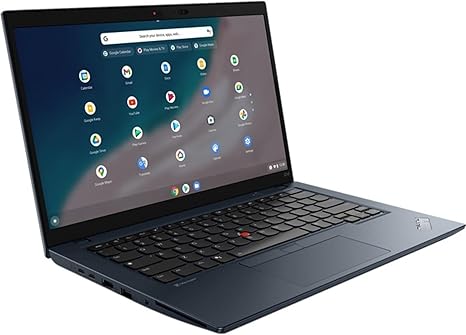
Welcome to “Reviews inside tv”! Today, we’re checking out the Lenovo TP C14 Chromebook, a laptop that’s built for those who need a reliable, lightweight machine for everyday tasks and beyond. Whether you’re a student, office worker, or just someone who loves the simplicity of Chrome OS, this Chromebook could be right up your alley. Let’s see if it really delivers.
The Lenovo TP C14 Chromebook comes with an Intel Core i5-1245U processor, which is a solid mid-range chip in Intel’s Alder Lake family. It offers a 10-core setup, with a mix of performance and efficiency cores, making multitasking a breeze. Whether you’re browsing the web with multiple tabs open, working on documents, or switching between apps, this chip does a great job of keeping things responsive. For a Chromebook, the i5-1245U strikes a nice balance between power efficiency and performance. It’s not built for heavy gaming or intense content creation, but for day-to-day use, it’s more than enough.
Paired with 8GB of RAM, this Chromebook handles typical workloads like document editing, web browsing, and video calls without breaking a sweat. 8GB is the sweet spot for most users, providing enough headroom for multitasking without causing significant slowdowns. You can run a few tabs in Chrome, listen to music, and even stream videos simultaneously with no issues. If you’re used to working on a high-powered laptop with 16GB or more, you might notice the difference in demanding tasks, but for everyday activities, 8GB does the trick.
On the storage side, the Lenovo TP C14 features a 256GB SSD, which is an upgrade over traditional SATA drives you find in cheaper models. While 256GB might seem a bit tight if you’re storing large files, it’s plenty for cloud-based work or casual storage of documents, photos, and videos. The fast read and write speeds of an NVMe SSD ensure that boot times are snappy and apps open without noticeable lag. Keep in mind that Chrome OS is designed to work seamlessly with cloud storage, so you’ll be able to access most of your files online if you need more space.
When it comes to the display, the TP C14 sports a 14-inch screen, which is a good balance between portability and usability. The resolution sits at 1920×1080, so full HD gives you sharp text and crisp images. It’s a typical display for this category—decent for streaming videos, web browsing, or even light photo editing. The colors are pretty accurate for most use cases, though it’s not an OLED or mini-LED panel, so you won’t get the deepest blacks or most vivid colors. Still, for a Chromebook, the display gets the job done.
Battery life is always a key factor with Chromebooks, and the Lenovo TP C14 doesn’t disappoint here. With its 5,200 mAh battery, you can expect anywhere from 8 to 12 hours of use depending on your workload. Light web browsing and document work will push it closer to the 12-hour mark, while heavier use, like streaming or running multiple apps, will bring it down to around 8 hours. Not bad at all for a laptop in this category.
At 5.2 pounds, this Chromebook isn’t the lightest on the market, but it’s still portable enough to carry around in a backpack or briefcase. It’s a little on the heavier side compared to other ultra-portable laptops, but the extra weight gives it a more solid feel. The build quality is typical Lenovo—durable, with a matte black finish that resists fingerprints. It’s not exactly the premium feel of an aluminum ultrabook, but it does feel sturdy.
Now, let’s talk about the keyboard and trackpad. The keyboard here is surprisingly comfortable for a Chromebook, with good key travel and responsive feedback. It’s great for long typing sessions—no complaints on that front. The trackpad is smooth, accurate, and has good palm rejection, making it a joy to use. There’s no touchscreen here, which is a bit of a bummer if you’re into that feature, but for the price, it’s not unexpected.
On the connectivity front, the Lenovo TP C14 offers a solid range of ports. You’ve got two USB Type-C ports, one USB-A port, a full-size HDMI, and a headphone jack. There’s no SD card slot, which is a slight downside for those who need to quickly transfer files from cameras or other devices. It also supports Wi-Fi 6, which ensures fast and stable wireless connectivity. Bluetooth 5.1 rounds out the package, ensuring you can connect your peripherals with minimal fuss.
Performance-wise, this Chromebook is more than capable of handling light to moderate workloads. Office tasks like word processing, spreadsheets, and presentations are handled easily. Web browsing with multiple tabs open feels smooth, even with 8GB of RAM. For media consumption, streaming 1080p content looks great on the display, and the speakers get loud enough for casual watching, though they aren’t particularly rich in bass.
When it comes to gaming, the integrated graphics aren’t going to give you smooth 60 FPS on AAA titles, but you can enjoy casual games or cloud gaming services like Stadia or GeForce Now if that’s your thing. For anything beyond that, the TP C14 is better suited for productivity than gaming.
In terms of thermal performance, the TP C14 stays relatively cool under load, with the fan only kicking in during more demanding tasks like video calls or streaming. The noise isn’t obnoxious—just a gentle hum in the background. Under heavy use, it doesn’t throttle too much, and you’ll only feel some warmth around the keyboard area.
Now, let’s quickly touch on the real-world usability. Setup is super easy, as with all Chromebooks. There’s minimal bloatware, so you can get straight to work. The Chromebook wakes up from sleep instantly, and Wi-Fi connectivity is strong. It’s a reliable machine with a consistent, responsive experience day-to-day.
When it comes to value, this Lenovo TP C14 Chromebook does its job well for its price point. It’s not going to win any awards for performance in gaming or heavy content creation, but for everyday tasks, it’s more than capable. The solid battery life, great keyboard, and reliable performance make it a strong contender in the mid-range Chromebook category.
So, who should buy this? If you’re a student, office worker, or someone who needs a reliable laptop for basic tasks, this is a solid option. It won’t break the bank, and it delivers everything you need without a lot of fluff. However, if you’re looking for heavy gaming performance or advanced content creation tools, you’ll want to look elsewhere.
Thanks for watching! The link to grab this laptop is in the comments box below. If you already own this model, feel free to share your experience in the comments—we’d love to hear from you. And don’t forget to like, subscribe, and hit the bell icon for more tech reviews. Until next time, keep your reviews inside the box!
Available to buy here: