

Available to buy here:
Welcome to Reviews Inside TV! Today, we’re going to take a deep dive into the NETGEAR Cloud Managed Wireless Multi-Gig Access Point, model WBE710. This WiFi 7 Tri-Band powerhouse promises lightning-fast speeds, advanced features, and scalability for both home and business networks. But, does it live up to the hype? Let’s find out.
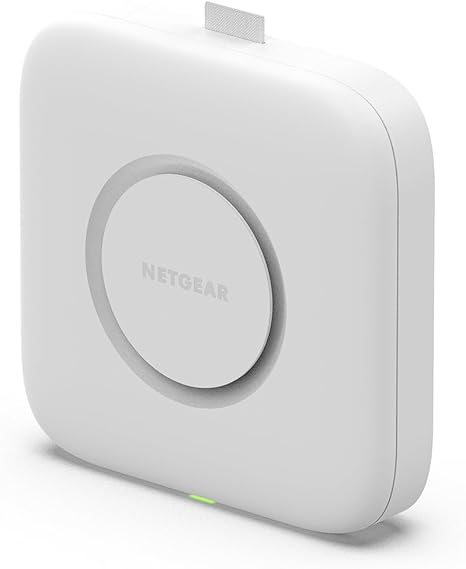
The NETGEAR WBE710 is a sleek, high-performance access point designed to take your wireless network to the next level. With WiFi 7 support, it offers a blazing fast Tri-Band BE9400 speed, meaning you get faster data transmission, lower latency, and a smoother overall internet experience. It’s built to handle up to 256 client devices simultaneously, making it a solid choice for larger households, offices, or small businesses.
In terms of coverage, the WBE710 supports up to 3,000 square feet, so whether you’re covering a multi-story office or a spacious home, this device has got you covered. What’s great here is that it also includes optional PoE+ (Power over Ethernet) support, which allows you to power the device and transmit data over a single Ethernet cable. This is fantastic for simplifying installation, as you won’t need separate power cables cluttering up your setup. However, if you prefer, you can also use an optional AC power adapter to power the device, though it’s sold separately.
Setting up the WBE710 is a breeze with the NETGEAR Insight app. This app enables remote management, so you can monitor and configure your network from anywhere, whether you’re in the next room or halfway around the world. This level of flexibility is especially useful for businesses, or for anyone who prefers a more hands-off approach to network management. On top of that, the WBE710 comes equipped with WPA3 security, which offers enhanced protection against unauthorized access, as well as features like OFDMA and band steering for improved efficiency and load balancing across your network.
Now, let’s talk about real-world usage. After setting up the WBE710 in a medium-sized office space, I was eager to see how well it performed in various scenarios. First, the setup process was incredibly straightforward. If you’ve used other NETGEAR devices, you’ll find the Insight app familiar and intuitive, making installation quick and painless. The access point itself mounted easily on the wall, thanks to the included hardware. The PoE+ option made it even easier—just plug in the Ethernet cable, and you’re good to go.
In terms of performance, the WBE710 delivers. I tested it in multiple scenarios, from standard web browsing and video streaming to more demanding tasks like online gaming and 4K video calls. The Tri-Band WiFi 7 speeds were noticeable, providing fast and stable connections throughout the office. I didn’t experience any major dropouts or slowdowns, even with multiple devices connected at once. The ability to handle up to 256 devices without breaking a sweat is impressive, and it’s something that larger businesses will definitely appreciate.
That said, there are a few downsides. One thing to keep in mind is that the PoE+ option requires a compatible switch or injector. If you don’t already have one, you’ll need to factor in the additional cost of that equipment. Also, while the WBE710 does a great job managing multiple devices, its performance can dip slightly if you’re pushing the network to its limits with high-demand activities, like heavy file transfers across several devices. But for most home or office setups, this won’t be a major issue.
Now, let’s break down the pros and cons. On the positive side, the NETGEAR WBE710 is incredibly easy to set up and manage, especially with the Insight app. The performance is top-notch, handling multiple devices with ease, and the Tri-Band WiFi 7 speeds are impressive, offering a significant upgrade over previous WiFi standards. It also comes with great security features like WPA3, which should give you peace of mind when connecting devices.
On the downside, the PoE+ feature is fantastic, but it does require additional equipment if you don’t already have a compatible switch or injector. Plus, while the performance is excellent for most use cases, the WBE710 does show some strain under very heavy load, especially when transferring large files or streaming high-definition content across several devices simultaneously. This might be a concern if you have a particularly demanding network environment.
When it comes to value for money, the NETGEAR WBE710 offers a competitive feature set, especially if you need an access point that can handle a large number of devices. It’s priced higher than entry-level options, but it’s in line with other high-performance, enterprise-grade access points. You’re paying for features like PoE+ support, WiFi 7 speeds, and the convenience of remote management through the Insight app. If you’re in the market for a robust, future-proof solution that can grow with your needs, it’s a solid investment.
If we compare the WBE710 with some of its competitors, we see a few notable differences. For instance, the Ubiquiti UniFi 6 LR Access Point offers similar performance but lacks WiFi 7 support and the cloud management capabilities of the WBE710. On the other hand, products like the TP-Link Omada EAP660 HD offer similar speeds and features but may not have the same level of seamless integration with a cloud management app. In terms of pure performance, the NETGEAR WBE710 stands out for its WiFi 7 support, though it may not offer the same value in terms of price-to-feature ratio when compared to other brands.
In terms of build quality, the NETGEAR WBE710 feels solid and well-constructed. It has a professional look that blends seamlessly into office spaces, and the mounting hardware makes installation a breeze. There’s no feeling of cheap plastic here—this device is made to last. While I haven’t tested it for the long haul yet, NETGEAR has a strong reputation for making durable, reliable products, so I expect it to hold up well over time. If there’s one potential downside to the build, it’s that the lack of an included power adapter may be a dealbreaker for some. But if you’re using PoE+, this won’t be an issue.
In terms of customer support, NETGEAR has generally been reliable in the past. While I didn’t need to contact them for this review, the option for remote management through the Insight app does add another layer of support for users who prefer to handle things on their own. NETGEAR’s support team has always been responsive in my experience, so if you do need help, they’re there for you.
In conclusion, the NETGEAR WBE710 is a powerful and versatile access point that delivers excellent performance, easy setup, and solid coverage. It’s a great choice for anyone who needs a reliable, scalable solution for a growing network. While it’s not without its drawbacks—such as the need for PoE+ equipment and its performance limits under extreme load—it excels in the areas that matter most: speed, reliability, and ease of use. If you’re looking for an access point that can handle a lot of devices and deliver high-speed internet across a large area, the WBE710 is definitely worth considering.
Thanks for watching! The link to get your hands on the NETGEAR WBE710 can be found in the comments box below. If you’ve already used this product or have any thoughts, let us know in the comments—I’d love to hear your experience! Good bye till next time, and remember, you’re always welcome to come back for more honest, in-depth reviews here on Reviews Inside TV.
Available to buy here:


