

Available to buy here:
Welcome back to “Reviews inside tv,” the channel where we dive deep into the tech and gadgets that make our lives a little easier and a lot more exciting. Today, we’re looking at the Thermaltake Level 20 RGB Titanium Aluminum Gaming Keyboard—yes, that’s a mouthful, but with good reason. This is a keyboard designed to not just meet, but exceed the expectations of gamers and creators alike, with its combination of high-end materials, RGB customization, and powerful functionality.
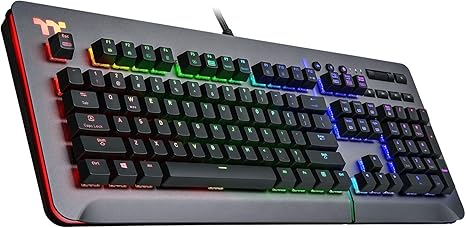
The Thermaltake Level 20 RGB features a premium aluminum faceplate and floating keys, providing a sleek, modern look that’s built to last. Underneath that sturdy exterior, it packs a punch with genuine Cherry MX switches, rated for 50 million keystrokes, ensuring you won’t have to worry about wear and tear anytime soon. But it doesn’t stop at just durability. This keyboard comes with 16.8 million color per-key and encircling RGB illumination, which isn’t just for show—it offers real customization, with 32 color zones and 13 dynamic effects on the front side, and 14 effects on the side panel. Whether you’re gaming or working, the lighting can adapt to your mood or environment.
But there’s more: the keyboard syncs with both Thermaltake’s TT RGB Plus software and Razer’s Chroma Sync, giving you seamless integration with compatible devices like your Thermaltake power and cooling products, or any Razer gear. This isn’t just a keyboard; it’s part of an ecosystem that connects everything together. And for those who like a little convenience while they work or game, the Level 20 features an audio and USB pass-through port for additional power and data options, plus dedicated multimedia and volume/mute keys for easy control.
Now, let’s talk about real-world use. Setting up the Thermaltake Level 20 was as easy as plugging it in and installing the TT RGB Plus software, which is where the magic happens. It didn’t take long to start experimenting with the lighting options, and the software itself was surprisingly intuitive for something that offers so many features. When it came to typing and gaming, the Cherry MX Silver switches lived up to the hype—quick, precise, and responsive, with just the right amount of resistance. I found myself breezing through both work tasks and gaming sessions without any issues, and that quick actuation was especially noticeable in fast-paced games like shooters and MMOs. The macro recording feature worked exactly as advertised, letting me program a combination of keys or lighting effects on the fly.
However, as with all products, it’s important to talk about the cons. While the aluminum faceplate and floating keys look fantastic, they also contribute to a certain amount of sound. If you’re in a quiet environment or streaming, you might find the clicks of the switches a little more pronounced than you’d expect. It’s not a dealbreaker, but it’s something to keep in mind. The lighting effects, while beautiful, can be a bit overwhelming, especially if you’re not the kind of person who enjoys a light show while gaming or working. Thankfully, you can adjust the brightness and speed, but it’s not for everyone. Also, the multimedia keys, while useful, could feel a bit cramped if you have large hands or are using the keyboard for long periods of time.
On the flip side, the keyboard’s build quality is impeccable. The aluminum faceplate feels solid and premium—no flex whatsoever. And those Cherry MX Silver switches? They’re a joy to use for both typing and gaming, offering a smooth, light feel that helps reduce fatigue during extended sessions. The RGB lighting, while potentially a bit much for some, offers incredible customization, and the ability to sync it with other Thermaltake and Razer products is a great touch. Plus, that on-the-fly macro recording? A real asset for gamers who need quick adjustments mid-game.
Now, in terms of value, this keyboard certainly positions itself as a premium product, and its price tag reflects that. But when you compare it to other high-end gaming keyboards with similar features, such as the Corsair K95 RGB Platinum or Logitech G Pro X, it holds its own. The build quality and RGB customization alone justify the price, but if you’re someone who doesn’t care about dynamic lighting effects or the added software features, you might find more budget-friendly options that offer a similar typing experience.
Let’s briefly look at how the Level 20 stacks up against its competitors. The Corsair K95 RGB Platinum, for instance, offers a similar Cherry MX switch feel but comes at a higher price, mostly due to the inclusion of additional features like dedicated macro keys and a wrist rest. The Logitech G Pro X, while also offering hot-swappable switches, comes in at a lower price point but doesn’t have the same level of RGB customization or synchronization options as the Thermaltake. For those who prioritize aesthetic customization and integration with other products in the Thermaltake or Razer ecosystems, the Level 20 stands out.
When it comes to build quality, this keyboard feels like it could last a lifetime. The aluminum faceplate adds a premium touch, and the key switches, rated for 50 million keystrokes, offer exceptional durability. Based on industry trends, I’d expect the Level 20 to hold up well over time, and considering Thermaltake’s reputation for reliable products, I don’t anticipate major issues down the line. If you’re looking for a keyboard that’s not just about performance but also looks, this is a solid contender.
In terms of customer support, I didn’t need to reach out for any assistance, which is always a good sign. Thermaltake is known for being responsive, but given the quality of the product, I don’t expect many users will have issues. It’s a well-built keyboard that should last, and Thermaltake’s reputation in the PC peripherals market is solid.
Now, to wrap things up, the Thermaltake Level 20 RGB Titanium Aluminum Gaming Keyboard is a standout in the high-end gaming keyboard market. It brings premium features like Cherry MX switches, stunning RGB customization, and software integration with Thermaltake and Razer products. Yes, there are some minor cons, like the slightly noisy switches and potentially overwhelming lighting effects, but if you’re someone who enjoys a customizable, high-performance keyboard, this is a product that’s hard to overlook. It’s built for those who want more than just a keyboard—it’s a tool that blends function and form into a single, cohesive package.
Thanks for watching, and if you’ve got any questions or thoughts about the Thermaltake Level 20, drop them in the comments below. Don’t forget to like, subscribe, and hit that bell icon so you never miss a review here on “Reviews inside tv.” Until next time, remember, the right keyboard can change the way you game—don’t settle for anything less.
Available to buy here:


